Showing posts with label HIKVISION. Show all posts

Thursday, January 26, 2017

Top 10 video surveillance cameras & NVR of 2016

Top 10 video surveillance cameras & NVR of 2016

In order to come up with a comprehensive assessment, the products on this list all adhere to the following guidelines:
·        The product must have been uploaded to the asmag dot com database between Jan. 2016 and Dec. 2016.
·        The main purpose of the camera must be for professional security; no Wi-Fi cameras, cube cameras, DIY, or cameras targeted at the smart home sector were included.
·        Only one camera per company was chosen.


Top 10 video surveillance cameras of 2016:

1. Hikvision DS-2CD6626DS-IZ(H)S Dark Fighter 2 MP anti-corrosion dome

2. Dahua HD-TPC-PT8320-T hybrid network PTZ camera


3. Axis XF40-Q1765 explosion protected fixed network camera


4. Sony SNC-VB770 ultra high sensitivity 4K network camera
5. Surveon CAM2441HI box network camera
6. LILIN ZR8022 1808p HD Day & Night autofocus IR IP camera
7. EverFocus EZN7221 2 MP Full HD ultra-low light camera

8. Pelco by Schneider Electric Optera 12 MP panoramic IP camera

9. DynaColor DynaHawk ZD series hyper mini fisheye IP camera


10. ITX NCB-2003PR/NCB-1303PR IP camera

Top 10 video surveillance NVR of 2016:

1. Wavestore A-Series NVR


2. QNAP VS-2204 Pro+ VioStor NVR

3. Merit LILIN NVR408M H.264 1080p real-time multi-touch vehicle standalone NVR

4. Milestone Husky M50A NVR
5. Hikvision DS-96128/2561NI-E16(-E24) Embedded Super NVR

6. Hunt HNR-16GSQ NVR

7. Dahua DH-NVR5216/5232-16P-4KS2 NVR
8. Verint Nextiva EdgeVR 100/200 Series NVR
9. EverFocus Commander 2 ENVR8008 NVR


10. Surveon NVR7800 series

Friday, April 8, 2016

The advantage of H.265 Camera

H.265 / HEVC is the latest video compression standard which is based on H.264, driven by ever increasing demand for high definition and the rapid development of imaging technology, UHD becomes trend in today's television and video surveillance market. UHD standards for ultra high definition includes 4K UHD and 8K UHD. 4K UHD equals 3840 x 2160 (approximate 8.29 megapixels), while 8K UHD equals 7680x4320 (approximate 33.18 megapixels). 
In today's video surveillance applications such as parking lot, hotel, safe city, harbor, air port and elsewhere large scaled and has growing demand on detail capturing, which, at the same time, pressuring on decoding and storage. Apparently, the introduction and development of H.265 standard brings extensive possibilities and optimism to the industry by addressing problems such as shortage of bandwidth, improving transmission efficiency and delivers other benefits.
In order to solve the high bandwidth problem for ultra high definition, the Moving Picture Experts Group (MPEG) developed the H.265/High Efficiency Video Coding. Compared with current mainstream H.264/MPEG-4 AVC, the H.265 is able to double the data compression ratio, while improve video quality with low bit-rate. The H.265 supports both 4K UHD and 8K UHD resolution up to 8192x4320. In conclusion, H.265 is capable of further reducing 50% the data rate requested for high quality video coding. Bitrate is acclaimed to have approximate 40% to 50% down at 1080p while rendering superb image quality.  This enables IP camera to deliver smooth video with low bandwidth, which in turn, reducing the network bandwidth, and video storage size. Meanwhile, with the rapid development of 4G cellular mobile technology, the integration between the H.265 and 4G will have much possibilities.
HEVC/H.265 mainly features in the following aspects:
·         Higher compression efficiency, when compared with H.264/AVC. In same resolution, HEVC/H.265 has lower bitrate than H.264/HEVC.
·         Support high definition, ultra high definition video formats
·         Support frame rate of 20-60 frame per second video decoding, has same flexibility like the H.264/AVC, supports maximum 172fps.
·         Friendly network adaptation.
As leading and innovative corporate, Hisilicon and Ambarella can't resist its charm and prospect, both of them introducing the first H.265 SoC for ultra high definition IP cameras. Despite the reason that H.265 is still a new compression standard to video surveillance industry, the security camera manufacturers such as Hikvision and Dahua have already adopted H.265 in their latest product portfolio, including ultra high definition network camera, NVRs.
To start with cameras, Hikvision has a latest-released 2 megapixel H.265 low light smart camera DS-2CD5026FWD-(A)(P). As H.265 camera, the Darkfighter series ultra-low light Smart cameras are able to capture high quality colored images in dim light environment. DS-2CD5026FWD offers Full HD resolution with up to 60fps high frame rate, 120dB WDR, Auto Back Focus, P-Iris, PoE, 3D DNR and complete Smart Feature-set to meet a wide variety of applications. It supports H.265/H.264/MJPEG dual video compression, allowing over 40% lesser bandwidth use while acquiring outstanding image quality. Moreover, with its functions such as Intrusion Detection, Line Crossing Detection, Scene Change Detection, Audio Surge Detection, Audio Loss Detection, Defocus Detection, Face Detection, etc.
On video storage perspective, Dahua and Hikvision introduced a comprehensive H.265 4K NVR product lineup, which covers different demands from small to medium as well as large scaled applications. These network video recorders have capability to support up to 12 megapixel recording capability, supporting 1080p@60fps and H.265 preview and playback; 4 channel 4K resolution real time live view and playback; meanwhile, the NVR has many intelligent functions including smart video analysis, facial detection, privacy mask.

Friday, March 18, 2016

Rising Biometrics Security Market Growth

Rising  Biometrics Security Market Growth

Biometrics has been the next big thing for over two decades.  Persistence Market Research released its own report entitled “Next Generation Biometric Market – PMR Market Insight Report 2015 to 2021”, in which the biometrics market is expected to grow at a significant growth rate.

TYPES OF BIOMETRIC DEVICES

• Automated fingerprint identification systems (AFIS)
• Palm and vein reading systems that supplement AFIS
• Non-automated fingerprint identification systems
• Facial recognition
• Iris scans
• Integrated AFIS, face, and iris systems
• DNA readers
• Biometric signatures
• Data encoders
• Bar coder
• Document scanner


According to the report, this explosive growth rate can be attributed to the increasing occurances of terrorism and the theft of crucial data and information, which have raised concerns about national and personal security.

The report covers a number of key topics, including market segmentation according to types, application, products and technology; geographic segmentation including North America, Europe, Asia and RoW; the market size and forecast for the different segments and geographies; company profiles of some of the market’s leading companies; and Porter’s five forces analysis of the market.

The report highlights some of several key drivers of the market, including the growth in e-passport program, government support and extensive use in criminal identification. Additionally, the increasing need for large scale surveillance at public gatherings and penetration of smartphones will also drive the global next-generation biometrics market.

In terms of challenges that hinder the growth of the global next generation biometrics market, the report singles out high cost of systems and fear of privacy intrusion.
In early 2015 Mobey Forum carried out a survey about biometrics amongst 235 respondents from Europe, North America and the Middle East, 59% of which were from banks and other financial institutions and 32% were from solution providers. 

The paper focuses on the applicability of biometrics as a method of identification, authentication and authorisation for services in mobile banking and payments services. It contends that the acceleration of mobile in the banking sector has been critical for getting biometrics out of the starting blocks. In partnership with mobile, biometrics offers considerable benefits, especially with regard to user experience. It should be noted that biometrics is also potentially valuable in other areas of financial services such as employee screening, know-your-customer, online dealing transactions, and insurance.


For banks and payment service providers, security is a minimum requirement, but convenience wins customers; they will not adopt security measures that are inconvenient. This is confirmed in the results of the survey and also by prevailing consumer attitudes to biometrics. Fuelled by the Apple ‘cool’ factor, users appear generally positive towards biometrics at this point, even across a range of age groups.
At the same time, historic concerns about biometrics, for example with regards to accuracy and price, are no longer so pressing. Other concerns, like security, however, still are. For biometrics to succeed, it must be used in combination with secure technologies for storage and processing.
Mobey Forum survey shows that the vast majority of banks intend to implement biometrics in the relatively near future, just as the number of handset manufacturers planning to integrate biometric capabilities into their devices rises.

Conversely, the growing use of biometric technology in e-commerce and cloud computing for biometric technology will serve as an opportunity, which should help fuel the growth of the global biometrics market.
The report identifies some of the key players dominating the market, including 3M, Cross Match Technologies, Inc., Facebanx, Fingerprint Cards AB, Fujitsu Ltd., Fulcrum Biometrics, NCE Corporation, RCG Holdings Limited, Safran SA, and Siemens AG. South Korean biometric technology firm VIRDI has integrated its access control solution with HIKVISION.

The new solution brings multi-factor recognition to the HIKVISION iVMS-5200P video surveillance software by allowing various authentication methods, such as a card, pin number, fingerprint, face, and mobile key. The total solution is based on ONVIF (Open Network Video Forum) which is a global standard. VIRDI’s managing director of sales commented in a statement that: “We will expand our overseas business cooperating with the global enterprise in security industry.”

The company had previously successfully integrated its fingerprint authentication system with PAXTON’s enterprise access control solution.

Biometrics technologies used for measuring and evaluating human body characteristics, like fingerprints, irises and retinas, vocal and facial patterns for authentication and identification purposes. A prominent rise in the embracing of biometrics technology can be seen in India over the last five years. In addition to the most high-flying and well-liked technique of biometric authentication, which is fingerprint recognition, additional means of biometric authentication are swiftly gaining traction in the country on account of the rising need for data security in miscellaneous sectors. India Government initiatives such as issuance of e-passports and emergence of e-banking and visa employing biometric systems for identification and authentication purposes, have been enormously boosting the use of biometric technology.


The growth of Biometrics in India is predicted to be massive on account of the proliferated uses of biometric devices in public as well as Indian private sectors. The need for enhanced security and to authenticate the access to confidential data has made the use of biometric devices mandatory for better performance of the organization. The report segments the market by end-user and geography. The report finds the major drivers for the face and voice biometrics market include growth in e-passport program, government support, biometrics in smartphones, use of biometric technology in banking and healthcare, extensive use in criminal identification, use of biometric technologies in election administration and growing need for large scale supervision at public meetings.


Latin America is one of the fastest growing regions in global biometrics market with countries such as Brazil, Mexico, and Argentina contributing majorly for the growth of the market. Market growth in Latin America would result from government expenditures and customer focused corporate investments. Brazil accounted a major share on the whole Latin America’s biometrics market. Government spending, increasing security spending, cybercrimes and deployment of face recognition scanners across borders and airports of countries, are the factors that are making the biometrics technology grow lucratively in Latin America.

Mexico is expected to grow with more number of projects such as national ID, voter ID, e-passports, e-driver’s license, and ID cards based on biometrics. Mexico is one of the key countries in global biometrics market, which is utilizing fingerprint, face and IRIS based biometric systems in its national ID project. Mexico and Argentina are developing their own biometric national ID systems to avoid identity fraud. Biometric identification system can help facilitate advancements in social, political, and economic development.
Demand for biometrics access control systems is expected to increase in the next two years. Brazil biometrics market is emerging as one of the fastest growing biometrics markets in Latin America. Sporting of international events such as FIFA World Cup 2014 and Olympics 2016, escalating private investments, rising security concerns and increasing government security spending, are the factors driving the growth of biometrics in Brazilian market. With the increase in the demand for these devices, more number of local manufacturers would want to step up their presence in the market.
The report offers the countries showing growth in Latin America and emerging companies along with a list of their Financials and presents a host of investment opportunities ready for the taking. This report on the outlook for lucrative investment areas reviews the potential future returns, technological advancements, regulations and market responses so as to provide a clear perspective on the potential implications for the growth prospects of Biometrics Market in Latin America during the forecast period (2014-2020).
DNA analysis market in the government sector in North America is growing at a CAGR of more than 10%. North America is an early adopter of DNA analysis technology due to high investments by government and law enforcement agencies in the US and Canada. However, the market is likely to experience saturation and a reduction in contribution from the government sector during the forecast period.

The DNA analysis market in the government sector in Europe is growing at a CAGR of close to 13%. The demand for DNA analysis solutions is augmented by increased security concerns at airports, railways, seaports, and borders caused by terrorist threats.

Wednesday, April 29, 2015

How to Setup Dual CCTV Monitors

How to Setup Dual Monitors

Using dual monitors refers to using two physical display devices to increase the viewing space running on a single computer. Microsoft Windows Operating Systems and Mac OS X now support dual and multiple monitor configurations.

Setting up dual monitors is easy. However, it requires the user to add a second video card or install a video card that can support a dual head or two separate physical outputs. The following instructions are for those with only one video card installed in their computers:-
Make sure that the computer is working fine and that it can support more than one video card. Boot in safe mode to make sure that only one video adapter and monitor is shown in Device Manager.
Next, turn off the system and install the second video card. Once installed, connect the second monitor.
If the installation is done correctly, the computer should boot the same way as always and the second monitor should still appear dark. Depending on the presence of the correct drivers bundled with the OS, drivers for the second video card may have to be installed.
Configuring Dual Monitors under Microsoft Windows
Check Device Manager. To do this, right-click My Computer then choose Properties > Hardware > Device Manager. There should be 2 monitors under the Display Adapters.

To configure the second monitor, right-click the desktop and choose Properties. Go to the Settings tab where there are two boxes, one bigger than the other. These represent the two monitors plugged into the computer. Click the second window marked “2” and change the second monitor’s resolution and color depth. Make sure that the display parameters chosen are within the monitors’ limits.
Do not forget to click the “Extend my Windows desktop into this monitor” option. If this is done properly, the 2 monitors should have the same size. Click OK and the 2nd monitor should work properly.
Troubleshooting Dual Monitor Setups
If the above instructions were followed but the second monitor is still not working, check if the operating system supports both monitors.

Also, check the kind of video card that was installed. If the computer has only one AGP slot and a PCI or ISA slot has to be used for the second video card, change the BIOS setting so that the PCI boots before the AGP display adapter.
Set up Dual Monitors Using a Splitter
In order to connect two monitors to the same computer, a VGA or DVI-D splitter can also be used, depending on the computer hardware’s specifications. A VGA splitter simply connects to a computer via a male-to-female VGA cable end. It then splits the digital signal into two parts, without compromising the quality of either part, and directs each part to its respective VGA cable end, allowing a single VGA cable to connect one computer to two separate VGA-based monitors. If a user wishes to connect more than two monitors to a computer, he/she should use a VGA splitter that uses more cable ends.
How to Display Separate Applications on Each Monitor
Although a VGA splitter connects two or more monitors to a single computer, the secondary monitor will be completely blank until the user makes the necessary changes to Windows. In order to display separate applications on each monitor:
1) Click the Start Menu and open the Control Panel.
2) Open the “Appearance and Personalization” category and select “Adjust screen resolution.”
3) Select the “Multiple Displays” menu and choose “Extend these displays.” This will activate the secondary monitor.

4) Launch the programs to be accessed and drag them to the secondary monitor. This is done by simply dragging the program window to the side of the primary monitor, causing the program to appear on the secondary monitor.

Sunday, October 26, 2014

HD-TVI, HD-CVI, HD-SDI, HD-AHD, Analog & IP Camera

HD-TVI, HD-CVI, HD-SDI, AHD, Analog & IP Camera
Even we enter into digital era, analog surveillance technology doesn't stop its innovation. Besides the HD-SDI and HD-CVI (in house technology of Dahua), today the Hikvision and other camera manufacturers announce HD-TVI cameras release.  HD-TVI means High Definition Transport Video Interface,  HD-TVI is based on traditional coaxial cable for video and data transmission, it supports not only 720P/1080P video signal, but also including audio, data signal over long distance up to 500 meters.

At present, there are approximate 100 million coaxial cables are deployed for analog camera connection. In the next 3-5 years, they will be replaced with high definition camera. However, some users start to worry they have to rewire, re-install or add new network devices for upgrading. This group of users prefer the economical and easy solution to upgrade existing system to HD, rather than adopting the IP camera. In this context, the HD-SDI and HD-TVI technologies were born.

HD-TVI advantages

500 meters long range video transmission:-
As we know, HD-SDI and conventional analog solutions only has limited 100 meters video transmission. Additionally, the cost of HD-SDI equipment is more expensive. The HDTVI technology (HikVision) offers long range distance video transmission at 1080P/720P through coaxial cable.  The cost of HD-TVI products is very affordable, permit users upgrade the system with minimum investment. This makes HDTVI become a perfect solution to fit all analog surveillance applications. Furthermore, the new HDTVI technology support UTC function which can allow user to remotely control the OSD menu and PTZ control via coaxial cable. This means user can quickly install and adjust the camera without accessing the camera itself.
HDTVI Camera with CS 4mm lens
Analog high definition resolution at 720P/1080P:-
Similar to HD-CVI (in house technology from Dahua) and HD-SDI, the new HDTVI cameras can deliver real time 720P/1080P HD resolution video without video latency. The HDTVI DVRs support full time 720P/180P video recording and playback. Through using HDTVI compatible cameras and DVRs, user can setup a complete new HD analog surveillance system or easily upgrade the existing conventional analog system to HD surveillance system.
HDTVI Camera with CS 12mm lens,
Broad manufacturers to offer great compatibility:-
HDTVI equipment is HDTVI open standard, which guarantees trouble-free connection to other HDTVI-compliant cameras and DVRs. By the way, the new designed HDTVI DVR also can support traditional standard video camera for offering great flexibility.  All HDTVI HD cameras can access third party DVRs equipped with HDTVI technology from other manufacturers. The main HDTVI members including TVT, Hikvision, Hisharp, Unifore, LSVT...etc.

HD-TVI vs Analog


In summary, the advantage of HD-TVI compared with Analogue is:
1.       HD resolution on 720P/1080P at 25/30fps
2.       Long distance transmission for HD video
3.       No video quality loss and delay for transmission

HD-TVI vs HD-CVI 

Obviously, HD-TVI and HD-CVI have very similar features, both of them can provide analog high definition solutions. HD-TVI derives from American based company that does not supply to only one manufacturer. Therefore we are expecting many analog camera manufacturers will release wide range of HD-TVI based cameras to market. Therefore, HD-TVI is more likely to become an industry standard, not a proprietary technology/solution.

HD-SDI vs HD-CVI 

HD-TVI vs HD-SDI 

In conclusion, compared with HD-SDI, new HD solution with advantages of:
1.       Longer video transmission distance up to 1000ft (300m) over regular coaxial cable
2.       700ft (200m) distance for video transmission over UTP (Cat5, twisted cable)
3.       More cheaper price for analog HD system
4.       Support twisted cable installation

HD-TVI vs IP Camera

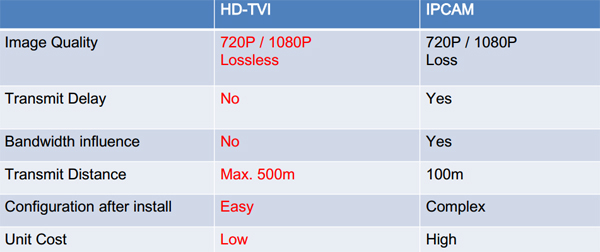
Hence, compared with IPC, the advantages of HD-TVI are
1.       No network bandwidth requirement/influence
2.       No network configuration, as easy as analog system
3.       No video quality loss and compression
4.       No video latency issue, real time live-view
5.       Long video transmission distance
6.       More affordable price for camera and video storage devices

AHD advantages

A new kind of camera: AHD Camera (Analog high definition)/HD-AHD is developing so soon in the market now.
The price is similar as Analog camera and the image effect is similar as digital camera!
The Advantages of AHD Camera:
1) AHD Camera can link with general DVR and the resolution is looks like 1000tvl analog cameras.
2) AHD Camera can link with AHD DVR, and the resolution is Megapixel High Definition ( Now have 1MP, 1.3MP already).
3) Transmit by Coaxial cable-500m!!
4) The price is similar as Analog system no matter considering DVR or camera.

HD-CVI cameras vs HD-AHD cameras

1.       1.0 megapixel AHD camera adopts OV9712 + NVP2431H solution (CMOS Chip: OV9712 & DSP Chips : Nextchip NVP2431H), while HD-CVI camera adopts the PO3100K + DH9801 solution. In addition to the difference of solution, the price vary greatly, OV9712 + NVP2431 of AHD camera module only costs US$7.5, and PO3100K + DH9801 camera module costs approximate US$11.
2.       AHD camera can connect to CRT display directly, the image can display properly. HD-CVI camera connects to traditional CRT, it doesn't show images. For video live view/recording/playback, HD-CVI cameras need to work with HD-CVI DVR. It seems, the HD-AHD cameras support 960H output mode, which is very convenient for test and installation. Since the AHD cameras can be backward compatible with all traditional analog equipment. Compared with HD-CVI, it has advantages of great compatibility.
3.       Competiable with normal D1 / 960H, and analog peripherals (including distributors, matrix, etc.). Switch AHD, IP and Anolog video signal from AHD DVR in no time.
4.       Strong anti-interference capability & solid interface protection that can avoid space high frequency electromagnetic radiation to ensure a constant signal transmission of high definition video display without problems as frame drop and lock loss occurred.
Back to Top